前言
AudioContext设计的API简直太多了,而且目前好多API还处在实验阶段,并未被所有浏览器完全支持, 所以本文不打算覆盖所有知识,只简单学习几个常用的API。先知其然,再知其所以然,也不失为一种学习方法嘛。 (其实好多我是真的不懂 😂)
简介
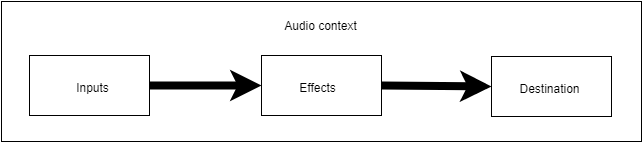
一个简单而典型的web audio流程如下:
创建音频上下文
在音频上下文里创建源 — 例如 aduio, 振荡器, 流
创建效果节点,例如混响、双二阶滤波器、平移、压缩
为音频选择一个目的地,例如你的系统扬声器
连接源到效果器,对目的地进行效果输出
效果视频
代码就不放了需要的可以点击这里看
实现
首先实现简单的播放音乐
html媒体标签有<HTML>,<video>等。其余如<input>标签需要转换为arraryBfuuer对象或者HTMLMediaElement对象处理后使用。
从html标签获得媒体源播放
媒体标签元素
1
2
3
4
|
<audio id='medio' controls src="https://jsdelivr.007666.xyz/gh/1802024110/GitHub_Oss@main/music/群青.mp3"></audio>
<button onclick="play()">播放</button>
|
1
2
3
4
5
6
7
8
9
10
11
12
13
14
15
16
17
18
19
20
| const medioAudio = document.getElementById('medio');
medioAudio.crossOrigin = 'anonymous';
function play() {
const ca = new (AudioContext || webkitAudioContext);
const source = ca.createMediaElementSource(medioAudio);
source.connect(ca.destination);
medioAudio.play();
}
|
非媒体标签元素
1
| <input type="file" accept="video/*,audio/*" id="medio2">
|
1
2
3
4
5
6
7
8
9
10
11
12
13
14
15
16
17
18
| <script>
const ca = new (AudioContext || webkitAudioContext);
const input = document.getElementById('medio2');
input.addEventListener('change', function () {
input.files[0].arrayBuffer().then(function (buffer) {
ca.decodeAudioData(buffer).then(function (data) {
const source = ca.createBufferSource();
source.buffer = data;
source.connect(ca.destination);
source.start();
})
})
})
</script>
|
从网络获得媒体源播放
1
| <button onclick="play()">播放</button>
|
1
2
3
4
5
6
7
8
9
10
11
12
13
14
15
16
17
18
19
20
21
22
23
24
| <script>
function play() {
const ca = new (AudioContext || webkitAudioContext);
fetch('https://jsdelivr.007666.xyz/gh/1802024110/GitHub_Oss@main/music/群青.mp3')
.then(res => {
res.arrayBuffer().then(arrayBuffer => {
ca.decodeAudioData(arrayBuffer).then(audioBuffer => {
const source = ca.createBufferSource();
source.buffer = audioBuffer;
source.connect(ca.destination);
source.start();
});
})
})
}
</script>
|
从设备录音播放(手机大部分不可用)
1
| <button id='medio' >开始录音</button>
|
1
2
3
4
5
6
7
8
9
10
11
12
13
14
15
16
17
18
19
20
21
22
23
24
25
26
27
28
29
30
31
32
33
34
35
36
37
38
39
40
| if (navigator.mediaDevices === undefined) {
alert('您的浏览器不支持录音功能,请更换浏览器');
}
const medio = document.getElementById('medio');
medio.addEventListener('click', function () {
navigator.mediaDevices.getUserMedia({
audio: {
sampleRate: 44100,
channelCount: 2,
},
video: false
}).then(function (stream) {
const ac = new (AudioContext || webkitAudioContext);
const soure = ac.createMediaStreamSource(stream);
soure.connect(ac.destination);
}).catch(function (err) {
switch (err.name) {
case 'NotFoundError':
alert('没有找到设备');
break;
case 'SecurityError':
alert('安全错误');
break;
case 'NotAllowedError':
alert('您以拒绝访问麦克风');
break;
case 'AbortError':
alert('硬件出错');
break;
default:
alert('未知错误');
break;
}
});
})
|
获得音频数据
1
2
3
| <input type="file" accept="video/*,audio/*" id="medio3">
<svg width="100%" height="100%" version="1.1" xmlns="http://www.w3.org/2000/svg"></svg>
|
1
2
3
4
5
6
7
8
9
10
11
12
13
14
15
16
17
18
19
20
21
22
23
24
25
26
27
28
29
30
31
32
33
34
35
36
37
38
39
40
41
42
43
44
45
46
47
48
49
50
51
52
53
54
| <script>
const ca = new (AudioContext || webkitAudioContext);
const input = document.getElementById('medio3');
input.addEventListener('change', function () {
input.files[0].arrayBuffer().then(function (buffer) {
ca.decodeAudioData(buffer).then(function (data) {
const source = ca.createBufferSource();
source.buffer = data;
const analyser = ca.createAnalyser();
analyser.fftSize = 512;
setInterval(() => {
let arr = new Uint8Array(analyser.frequencyBinCount);
analyser.getByteFrequencyData(arr)
arr = arr.slice(5, 170);
draw(arr);
}, 50);
source.connect(analyser);
analyser.connect(ca.destination);
source.start();
})
})
})
function draw(arr) {
const svg = document.querySelector('svg');
svg.innerHTML = '';
for (i = 1; i < arr.length; i++) {
const line = document.createElementNS('http://www.w3.org/2000/svg', 'line');
const width = window.innerWidth;
line.setAttribute('x1', (i * (width / arr.length)));
line.setAttribute('y1', 255);
line.setAttribute('x2', i * (width / arr.length));
line.setAttribute('y2', arr[i]);
line.setAttribute('stroke', `rgb(${arr[i]},99,${arr[i]})`);
line.setAttribute('stroke-width', 1 + 'px');
svg.appendChild(line);
}
}
</script>
|
Markdown显示效果不好