AI
海灵总结
海灵提示:今天海灵带大家看看如何在Hugging Face Space部署CLIProxyAPI与CPA Manager Plus同域方案。针对Space只暴露单端口的限制,该方案在单容器内同时运行这两个服务和Caddy。Caddy监听公网端口,根据路径将流量分发给内部的API服务和管理面板,省去了买VPS的成本,轻松实现免费同域部署。
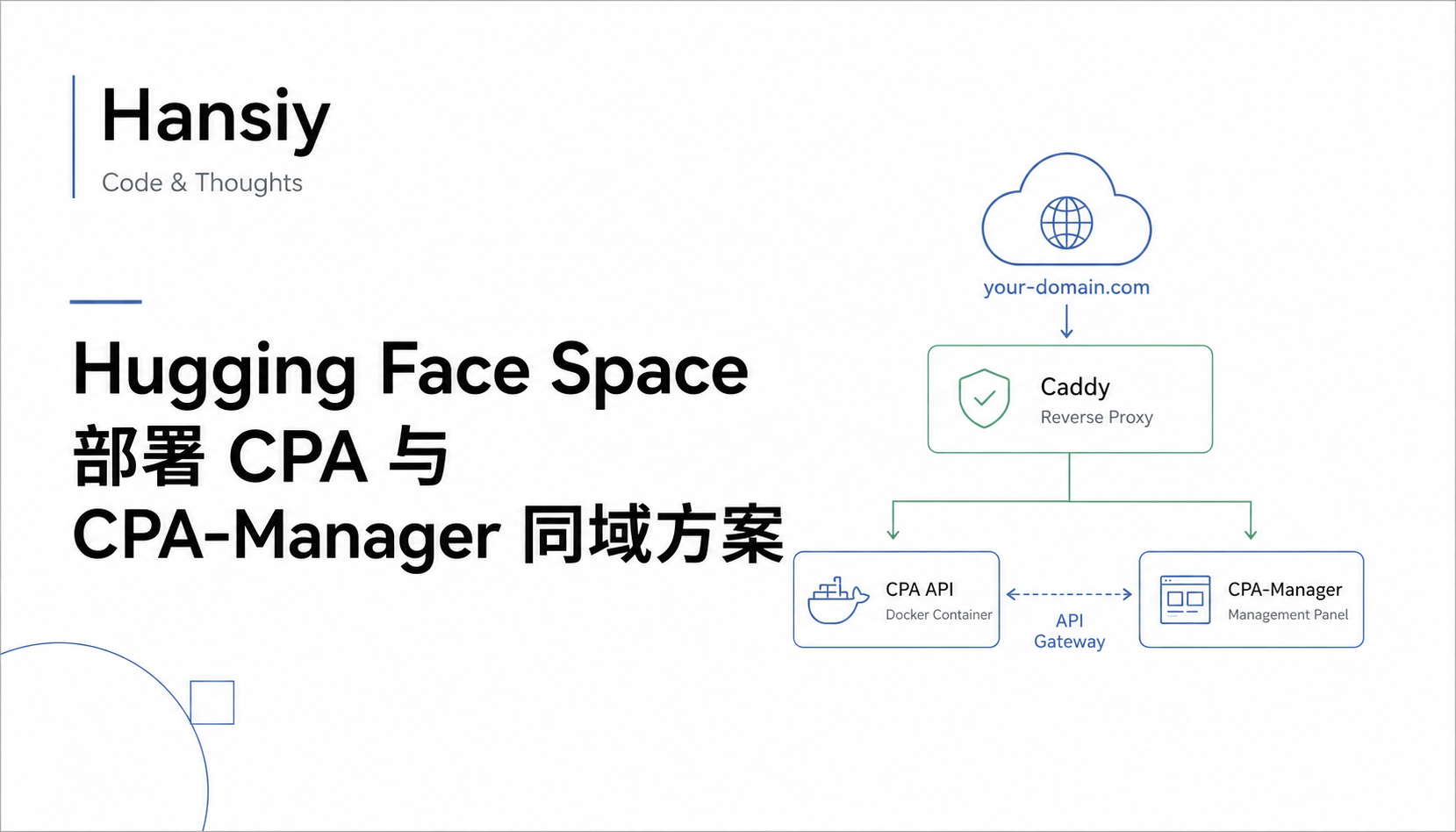
最近折腾了一套把 CLIProxyAPI 和 CPA Manager Plus 部署到 Hugging Face Space 的方案。目标很明确:不买 VPS,尽量使用免费资源,把 API 网关、管理面板和用量统计放在同一个 Space 里运行,并且通过同一个域名访问。
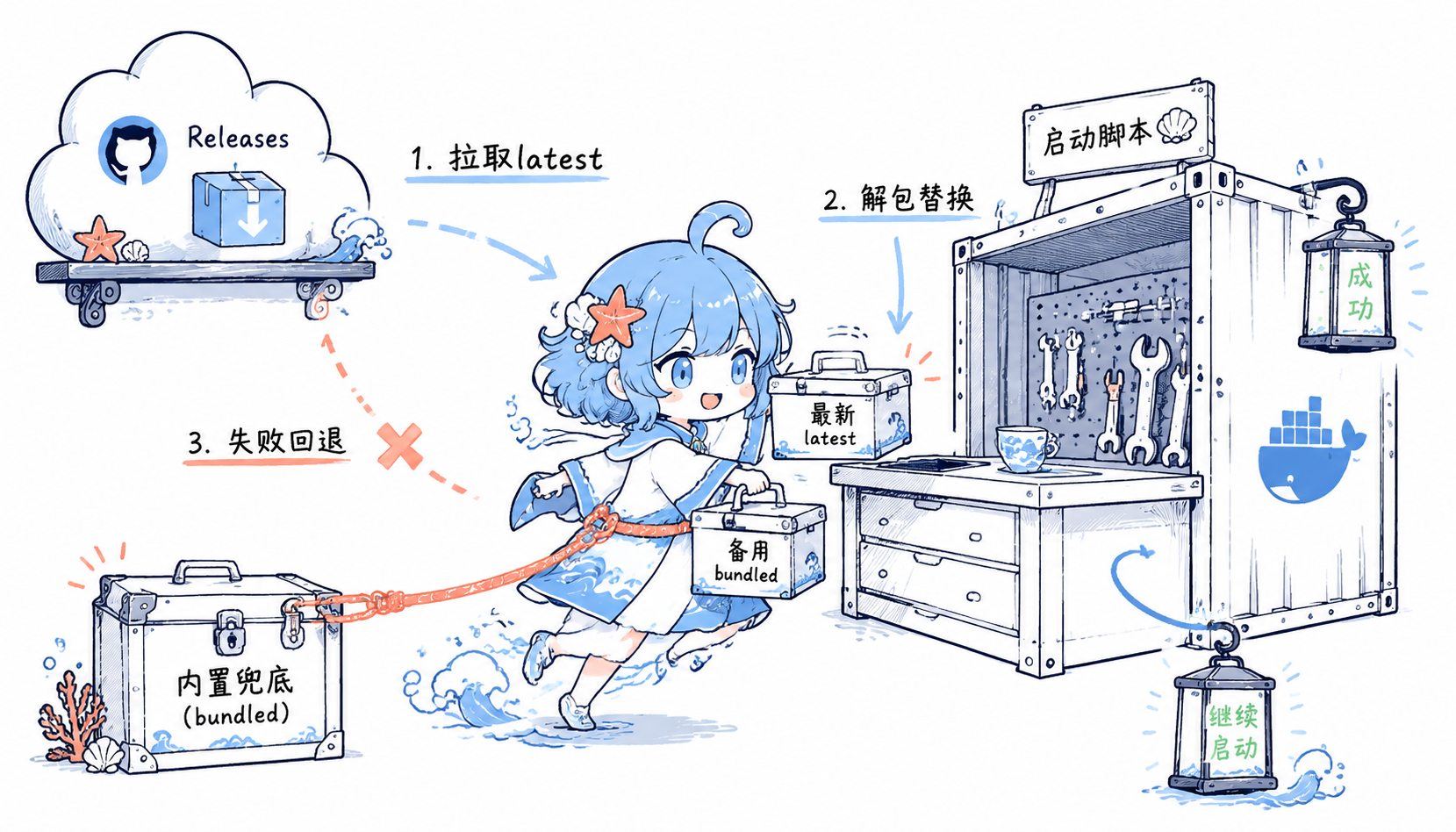
这篇文章最早写的是 CPA + CPA-Manager 的同域部署。后来 CPA 的用量统计和管理面板能力有变化,我把方案更新成了 CLIProxyAPI + CPA Manager Plus 。现在的部署方式还有一个小改动:容器启动时会自动拉取最新的 CPA 和 CPA Manager Plus 二进制,下载失败时再回退到镜像里内置的旧二进制,避免每次上游发版都要手动改 Dockerfile。
最终访问结构如下:
CPA 主服务:
https://username-space-name.hf.space/

CPA Manager Plus 管理面板:
https://username-space-name.hf.space/cpm/
为什么不能直接照搬 VPS 方案 在 VPS 上,常见做法是:
Docker Compose 跑 cli-proxy-api 和 cpa-manager-plus
宿主机 Caddy 负责 HTTPS 和反代
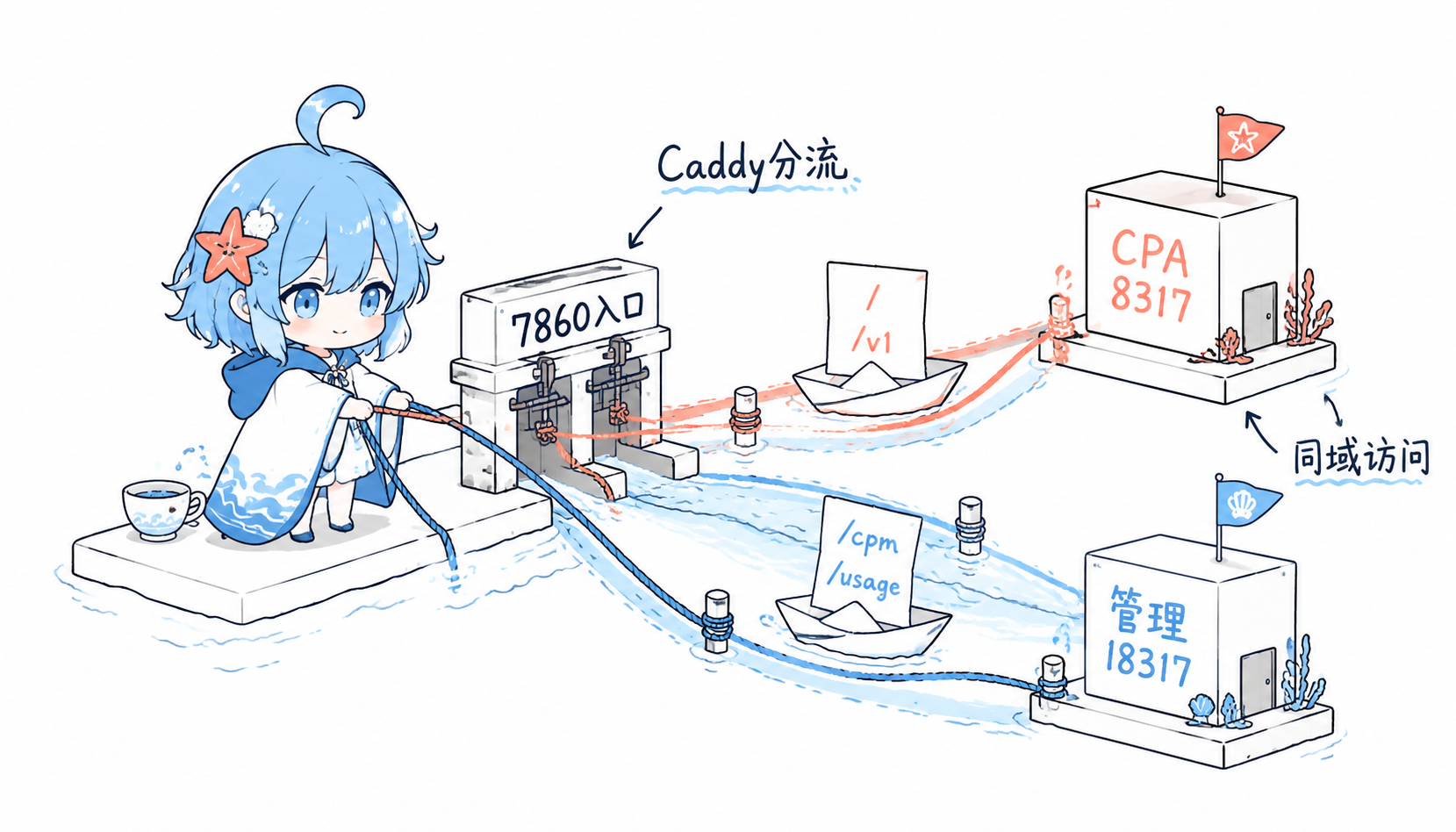
但是 Hugging Face Docker Space 的模型不一样。Space 对公网通常只暴露一个应用端口,默认是 7860。也就是说,不能像 VPS 一样直接把多个容器、多个端口都暴露出去。
所以 Space 里的方案要改成:
一个 Docker 容器
容器内同时启动:
- CLIProxyAPI
- CPA Manager Plus
- Caddy

公网只暴露:
- 7860

内部端口:
- 8317  -> CLIProxyAPI
- 18317 -> CPA Manager Plus
- 7860  -> Caddy 反代入口
路由关系如下:
/                    -> CLIProxyAPI
/v1/*                -> CLIProxyAPI
/cpm/                -> CPA Manager Plus 管理面板
/health              -> CPA Manager Plus
/status              -> CPA Manager Plus
/setup               -> CPA Manager Plus
/usage-service/*     -> CPA Manager Plus
/v0/management*      -> CPA Manager Plus,再由它按需要代理到 CPA
简单来说,外部只有一个入口 7860,Caddy 根据路径把请求转发给内部不同服务。/cpm/ 是管理面板入口,其他 OpenAI-compatible API 请求仍然走 CPA。
新建 Hugging Face Docker Space 进入:
https://huggingface.co/new-space
建议配置:
Space SDK: Docker
Visibility: Public 或 Private
Hardware: CPU Basic
Space 仓库里放这些文件:
Dockerfile
Caddyfile
config.yaml
start.sh
README.md
cli-proxy-api
cpa-manager-plus
其中 cli-proxy-api 和 cpa-manager-plus 是兜底二进制。正常情况下,容器启动时会先从 GitHub Releases 拉最新版本;如果 GitHub 网络临时失败,才使用这两份内置文件。
Dockerfile Dockerfile 只负责准备运行环境、复制兜底二进制和配置文件。不要在 Docker build 阶段去 ADD https://api.github.com/.../releases/latest,我实测 Hugging Face 的构建器可能会因为远程 ADD 的缓存处理失败,导致 Space 进入 BUILD_ERROR。
FROM alpine:3.21 RUN apk add --no-cache bash ca-certificates caddy curl jq libc6-compat WORKDIR /app COPY cli-proxy-api /app/cli-proxy-api COPY cpa-manager-plus /app/cpa-manager-plus RUN chmod +x /app/cli-proxy-api /app/cpa-manager-plus RUN mkdir -p /tmp/.cli-proxy-api /tmp/logs /tmp/pg_cache/pgstore /data \ && chmod -R 777 /tmp /data COPY config.yaml /app/config.yaml COPY Caddyfile /app/Caddyfile COPY start.sh /app/start.sh RUN cp /app/config.yaml /app/config.example.yaml \ && chmod +x /app/start.sh ENV TZ=Asia/ShanghaiENV PORT=7860 ENV HTTP_ADDR=0.0 .0.0 :18317 ENV USAGE_DATA_DIR=/dataENV USAGE_DB_PATH=/data/usage.sqliteENV CPA_MANAGER_DATA_KEY_PATH=/data/data.keyENV USAGE_COLLECTOR_MODE=autoENV USAGE_BATCH_SIZE=100 ENV USAGE_POLL_INTERVAL_MS=500 ENV USAGE_QUERY_LIMIT=50000 ENV USAGE_CORS_ORIGINS=*ENV USAGE_RESP_QUEUE=usageENV USAGE_RESP_POP_SIDE=rightEXPOSE 7860 CMD ["/app/start.sh" ]
这里有两个关键点。
第一,仍然保留:
RUN cp /app/config.yaml /app/config.example.yaml
CLIProxyAPI 启动时会读取这个模板文件,缺少它可能会报:
open /app/config.example.yaml: no such file or directory
第二,不建议把 CPA_MANAGER_ADMIN_KEY 写死在 Dockerfile 里。这个值相当于管理面板的管理员密码,应该放到 Space 的 Settings -> Variables and secrets 里。
config.yaml CPA 不要直接监听 7860,否则会和 Caddy 冲突。这里让 CPA 监听内部端口 8317。
host: "0.0.0.0"
port: 8317

pgstore-dsn: "${PGSTORE_DSN}"

auth-dir: "/tmp/.cli-proxy-api"
logging-to-file: true
logs-dir: "/tmp/logs"

remote-management:
  enabled: true
  secret-key: "${MANAGEMENT_PASSWORD}"

usage-statistics-enabled: true
redis-usage-queue-retention-seconds: 600

commercial-mode: true
debug: false
如果需要持久化配置,推荐使用外部 PostgreSQL,例如 Aiven、Supabase 等。连接串放到 Space Secret 里,不要写进仓库。
Caddyfile Caddy 监听 7860,负责把外部请求分发给内部的 CPA 和 CPA Manager Plus。
:7860 {
	encode gzip zstd

	redir /cpm /cpm/

	handle /cpm/ {
		rewrite * /management.html
		reverse_proxy 127.0.0.1:18317 {
			header_up Host {host}
			header_up X-Real-IP {remote_host}
			header_up X-Forwarded-For {remote_host}
			header_up X-Forwarded-Proto {scheme}
		}
	}

	handle_path /cpm/* {
		reverse_proxy 127.0.0.1:18317 {
			header_up Host {host}
			header_up X-Real-IP {remote_host}
			header_up X-Forwarded-For {remote_host}
			header_up X-Forwarded-Proto {scheme}
		}
	}

	handle /health {
		reverse_proxy 127.0.0.1:18317
	}

	handle /status {
		reverse_proxy 127.0.0.1:18317
	}

	handle /setup {
		reverse_proxy 127.0.0.1:18317
	}

	handle /usage-service/* {
		reverse_proxy 127.0.0.1:18317
	}

	handle /v0/management* {
		reverse_proxy 127.0.0.1:18317
	}

	handle {
		reverse_proxy 127.0.0.1:8317 {
			header_up Host {host}
			header_up X-Real-IP {remote_host}
			header_up X-Forwarded-For {remote_host}
			header_up X-Forwarded-Proto {scheme}
		}
	}
}
/cpm/ 单独 rewrite 到 /management.html 是为了避免 CPA Manager Plus 自己重定向到根路径后,被 Caddy 转发给 CPA,导致页面 404。
start.sh 启动脚本负责做三件事:
设置 CPA Manager Plus 连接 CPA 所需的环境变量。
启动时尝试下载最新版 CLIProxyAPI 和 CPA Manager Plus。
同时拉起 CPA、CPA Manager Plus 和 Caddy。
核心逻辑如下,完整脚本可以直接放到 Space 仓库里:
#!/usr/bin/env bash set -euo pipefailexport CPA_UPSTREAM_URL="${CPA_UPSTREAM_URL:-http://127.0.0.1:8317} " export CPA_MANAGEMENT_KEY="${CPA_MANAGEMENT_KEY:-${MANAGEMENT_PASSWORD:-} } " export HTTP_ADDR="${HTTP_ADDR:-0.0.0.0:18317} " export USAGE_DATA_DIR="${USAGE_DATA_DIR:-/data} " export USAGE_DB_PATH="${USAGE_DB_PATH:-/data/usage.sqlite} " export CPA_MANAGER_DATA_KEY_PATH="${CPA_MANAGER_DATA_KEY_PATH:-/data/data.key} " export USAGE_COLLECTOR_MODE="${USAGE_COLLECTOR_MODE:-auto} " export CPA_VERSION="${CPA_VERSION:-latest} " export CPA_MANAGER_PLUS_VERSION="${CPA_MANAGER_PLUS_VERSION:-latest} " CPA_BIN="/app/cli-proxy-api" CPAM_BIN="/app/cpa-manager-plus"
CPA_VERSION 和 CPA_MANAGER_PLUS_VERSION 默认都是 latest。如果你想临时锁定版本,比如回滚到某个稳定版本,可以在 Space 变量里设置:
CPA_VERSION=v7.1.54
CPA_MANAGER_PLUS_VERSION=v1.2.0
下载 latest 的思路是调用 GitHub Releases API,按当前 CPU 架构匹配 Linux 包:
download_release_asset local repo="$1 " local version="$2 " local pattern="$3 " local output="$4 " local api_url asset_url if [[ "${version} " == "latest" ]]; then api_url="https://api.github.com/repos/${repo} /releases/latest" else api_url="https://api.github.com/repos/${repo} /releases/tags/${version} " fi if ! asset_url="$(curl -fsSL -H 'Accept: application/vnd.github+json' -H 'User-Agent: agri-gateway-runtime' "${api_url} " \ | jq -r --arg pattern "${pattern} " '.assets[] | select(.name | test($pattern) ) | .browser_download_url' \ | head -n 1)" ; then echo "Failed to read release metadata from ${api_url} " >&2 return 1 fi if [[ -z "${asset_url} " || "${asset_url} " == "null" ]]; then echo "No release asset matched ${pattern} in ${repo} @${version} " >&2 return 1 fi curl -fsSL "${asset_url} " -o "${output} " }
CPA 和管理面板的下载都做成了“失败不退出”的兜底逻辑:
if download_release_asset "router-for-me/CLIProxyAPI" "${CPA_VERSION} " "CLIProxyAPI_.*_linux_${cpa_release_arch} \\.tar\\.gz$" "${release_dir} /cpa.tar.gz" \ && tar -xzf "${release_dir} /cpa.tar.gz" -C "${release_dir} /cpa" \ && cp "${release_dir} /cpa/cli-proxy-api" "${bin_dir} /cli-proxy-api" \ && chmod +x "${bin_dir} /cli-proxy-api" ; then CPA_BIN="${bin_dir} /cli-proxy-api" else echo "Failed to download CPA ${CPA_VERSION} . Using bundled /app/cli-proxy-api." >&2 fi if download_release_asset "seakee/CPA-Manager-Plus" "${CPA_MANAGER_PLUS_VERSION} " "cpa-manager-plus_.*_linux_${cpam_release_arch} \\.tar\\.gz$" "${release_dir} /cpam.tar.gz" \ && tar -xzf "${release_dir} /cpam.tar.gz" -C "${release_dir} /cpam" \ && cp "$(find "${release_dir} /cpam" -type f -name cpa-manager-plus | head -n 1) " "${bin_dir} /cpa-manager-plus" \ && chmod +x "${bin_dir} /cpa-manager-plus" ; then CPAM_BIN="${bin_dir} /cpa-manager-plus" else echo "Failed to download CPA Manager Plus ${CPA_MANAGER_PLUS_VERSION} . Using bundled /app/cpa-manager-plus." >&2 fi
最后启动三个进程:
"${CPA_BIN} " --config /app/config.yaml &cpa_pid=$! "${CPAM_BIN} " &cpam_pid=$! caddy run --config /app/Caddyfile --adapter caddyfile & caddy_pid=$! cleanup kill "${cpa_pid} " "${cpam_pid} " "${caddy_pid} " 2>/dev/null || true } trap cleanup EXIT INT TERMwait -n "${cpa_pid} " "${cpam_pid} " "${caddy_pid} " exit_code=$? cleanup wait || true exit "${exit_code} "
Space 环境变量 在 Space 的 Settings -> Variables and secrets 中配置:
PGSTORE_DSN                 Secret
MANAGEMENT_PASSWORD        Secret
CPA_MANAGER_ADMIN_KEY      Secret
MANAGEMENT_STATIC_PATH     /tmp
PGSTORE_LOCAL_PATH         /tmp/pg_cache
TZ                         Asia/Shanghai
PORT                       7860
可选版本控制变量:
CPA_VERSION                latest
CPA_MANAGER_PLUS_VERSION  latest
PostgreSQL 连接串示例:
postgres://username:password@host:port/defaultdb?sslmode=require
注意不要把真实连接串、管理密码、管理员 key 提交到 GitHub,也不要写进 README 或博客。
触发部署 如果使用 hf CLI,可以直接上传修改过的文件触发 Space rebuild:
hf upload username/api-gateway-education-lab . . \
  --repo-type space \
  --include Dockerfile \
  --include start.sh \
  --commit-message "Download latest CPA binaries at runtime"
查看状态:
hf spaces info username/api-gateway-education-lab --json
查看构建日志:
hf spaces logs username/api-gateway-education-lab --build --tail 80
查看运行日志:
hf spaces logs username/api-gateway-education-lab --tail 80
如果状态从 APP_STARTING 变成 RUNNING,基本就部署完成了。
启动验证 Space 构建完成后,可以访问:
https://username-space-name.hf.space/usage-service/info
如果 CPA Manager Plus 正常,会返回类似:
{ "service" : "cpa-manager-plus" , "mode" : "embedded" , "configured" : true , "adminReady" : true , "setupRequired" : false }
管理面板访问:
https://username-space-name.hf.space/cpm/
CPA OpenAI-compatible 接口访问:
https://username-space-name.hf.space/v1
如果访问 / 返回 404,不一定是部署失败。很多时候只是 CPA 根路径没有页面,应该重点测试 /cpm/、/usage-service/info 和 /v1。
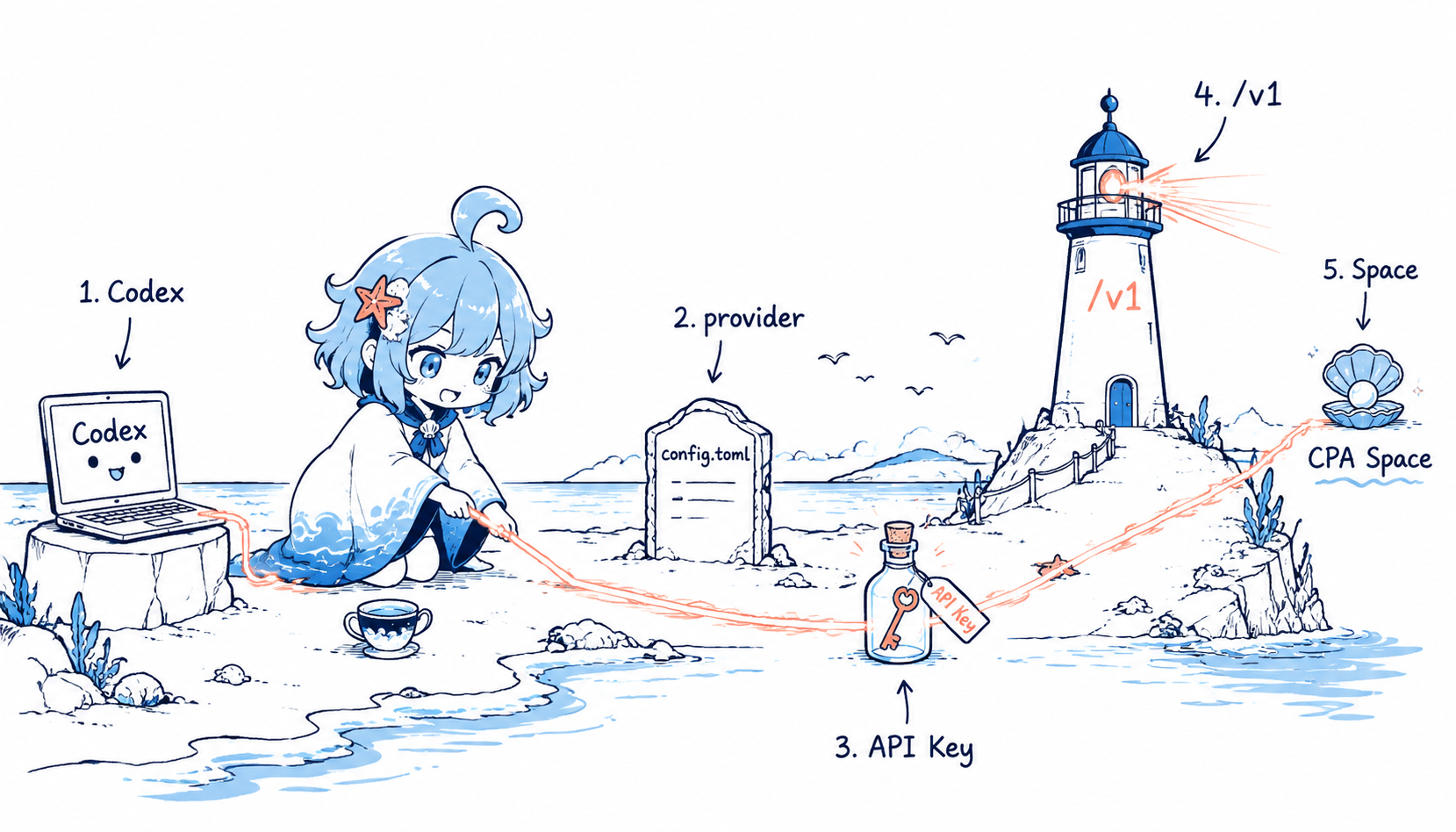
Codex 接入 CPA Space 如果想让 Codex 默认走这个 Space,可以在 ~/.codex/config.toml 里添加自定义 provider:
model = "gpt-5.5"
model_provider = "cpa_space"

[model_providers.cpa_space]
name = "CPA Space"
base_url = "https://username-space-name.hf.space/v1"
wire_api = "responses"
env_key = "CPA_SPACE_API_KEY"

[profiles.cpa_space]
model_provider = "cpa_space"
model = "gpt-5.5"
然后设置环境变量:
[Environment ]::SetEnvironmentVariable("CPA_SPACE_API_KEY" , "your-cpa-api-key" , "User" ) $env:CPA_SPACE_API_KEY ="your-cpa-api-key"
测试:
codex exec --ephemeral --skip-git-repo-check "Reply with exactly: OK"
如果返回 OK,说明 Codex 已经走到了你的 CPA Space。
常见问题 Space 进入 BUILD_ERROR 先看构建日志:
hf spaces logs username/api-gateway-education-lab --build --tail 120
如果你在 Dockerfile 里用了类似下面这种远程 ADD:
ADD https://api.github.com/repos/router-for-me/CLIProxyAPI/releases/latest /tmp/cpa-latest-release.json
Hugging Face builder 可能会因为缓存处理失败而报错。更稳的做法是 Dockerfile 只复制兜底二进制,把 latest 下载放到 start.sh 运行时做。
Space 一直 Building 或 Starting 先看 Logs。只要日志里已经看到服务启动成功,可以直接访问 Space 域名测试。有时页面状态显示会滞后。
/cpm/ 打开后 404通常是 CPA Manager Plus 重定向到了 /management.html,但 Caddy 把这个路径转给了 CPA。解决方式是给 /cpm/ 单独 rewrite:
handle /cpm/ {
	rewrite * /management.html
	reverse_proxy 127.0.0.1:18317
}
/ 返回 404这不一定是错误。CPA 主服务本身可能没有根页面。更可靠的验证方式是:
/cpm/
/usage-service/info
/v1
API Key 或认证文件不见了 CPA 的数据库配置和认证文件不是一回事。数据库可以保存配置和用量,认证文件通常走 auth-dir。如果 auth-dir 放在 /tmp,Space 重启后认证文件可能丢失。
如果要长期稳定,建议:
配置和用量 -> PostgreSQL
认证文件 -> 重新上传,或改造为持久化路径
Codex 提示 Missing environment variable 说明当前 Codex 进程没有读到环境变量。设置后需要重开终端或重启 Codex:
[Environment ]::SetEnvironmentVariable("CPA_SPACE_API_KEY" , "your-cpa-api-key" , "User" )
Codex 提示 Approaching rate limits 这个提示通常和当前模型、上游账号额度、共享 API Key 的整体使用量有关,不代表一句话就把额度用完了。如果默认使用高消耗模型,比如 gpt-5.5,Codex 会更早提示切换到 mini。
总结 这套方案的核心是:Hugging Face Space 只暴露一个公网端口,所以要在单容器里跑多进程,再用 Caddy 做内部路由。
最终结构是:
Hugging Face HTTPS
        |
        v
Space :7860 Caddy
        |
        +-- /      -> CLIProxyAPI :8317
        +-- /cpm/  -> CPA Manager Plus :18317
现在的版本更新策略是:
容器启动
  -> 尝试从 GitHub Releases 下载 latest CPA / CPA Manager Plus
  -> 下载成功:使用最新版
  -> 下载失败:使用镜像内置兜底二进制
这样日常部署不用频繁改版本号,同时也不会因为 GitHub Releases 临时访问失败导致整个 Space 起不来。缺点是免费 Space 的文件系统不适合保存重要认证文件,生产使用时要特别注意 Secret 管理、数据库持久化和访问密钥轮换。